Clarion
Identity & packaging · 160 × 100 × 46mm · 29 July 2026
01 The mark
One mark: the word. Cormorant Garamond, weight 500, all caps, 0.34em letter-spacing — the tracking is the identity, never tighten it. Clear space of one cap-height all round. Minimum 18mm wide in print.
02 Colour
03 Type
Clarion · Hearing Aids
16 channels · 125h battery · Bluetooth
04 The box
Nothing of theirs has been rewritten. Every warning, the package contents, the manufacturer block, "Made in China" and both label zones are exactly as they appear on the supplier's die — the legal block is set smaller, not cut. Changed: colour, typeface, and your name where their logo was. Added: "Australian owned" on the front, and two claim panels on the back — Australian owned and Engineered in the USA · sound processing — placed beside the origin block, not in place of it.
Suppression
Digital Chip
Concealment
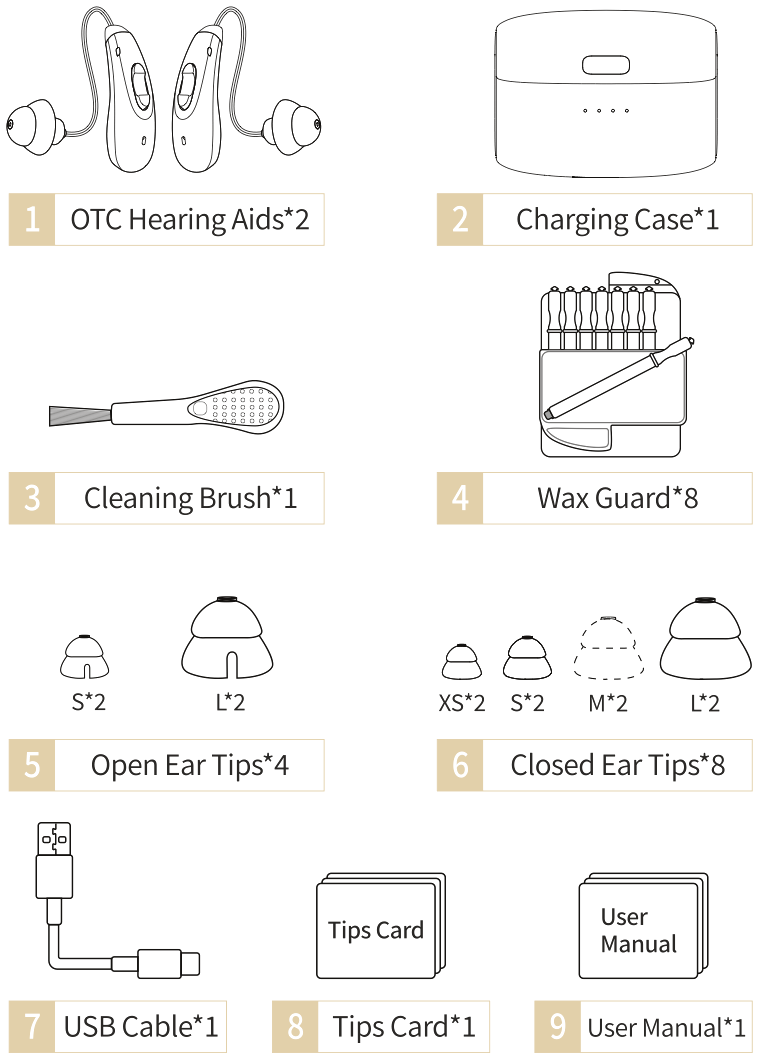
Package Contents
- Hearing aids
- Charging case
- Silicone ear tips
- User manual
- USB charging cable
- Tips card
The World
Digital Hearing Aids
Enjoy Life
processing
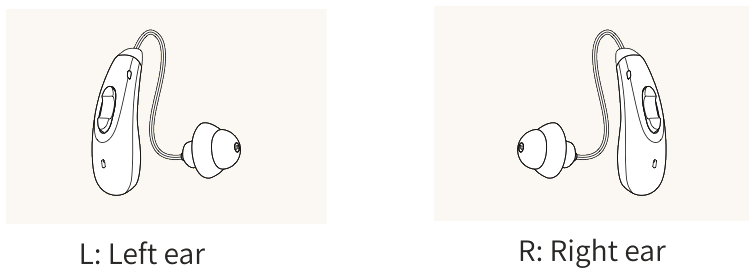
left and right
USB-C rechargeable
hello@clarionhearingaids.com
OTC Hearing Aids
WARNING: When to See a Doctor
If you have any of the problems listed below, see a doctor, preferably an ear-nose-throat doctor (ENT).
- Your ear has a birth defect or an unusual shape. Your ear was injured or deformed in an accident.
- You saw blood, pus, or fluid coming out of your ear in the past 6 months.
- Your ear feels painful or uncomfortable.
- You have a lot of ear wax, or you think something could be in your ear.
- You get really dizzy or have a feeling of spinning or swaying (called vertigo).
- Your hearing changed suddenly in the past 6 months.
- Your hearing changes: it gets worse then gets better again.
- You have worse hearing in one ear.
- You hear ringing or buzzing in only one ear.
Caution
1. Battery life and charging time may vary, depending on environment, volume, audio sources etc.
If you are younger than 18, do not use this. You should go to a doctor, preferably an ear-nose-throat doctor (an ENT), because your condition needs specialized care. Over-the-counter hearing aids is only for users who are age 18 or older.
2. For the need of technical improvement and system upgrade, information and specifications contained herein may be subject to change from time to time without prior notice.
Contract Manufacturer: Tomore Healthcare (Dongguan) Co., Ltd.
Manufacturer Address: Room 201, Building 1, Xiantaoyuan Industrial Zone, Silian Community, Henggang Street, Longgang District,Shenzhen, GUANGDONG, 518000,CHINA Made in China

05 The manual
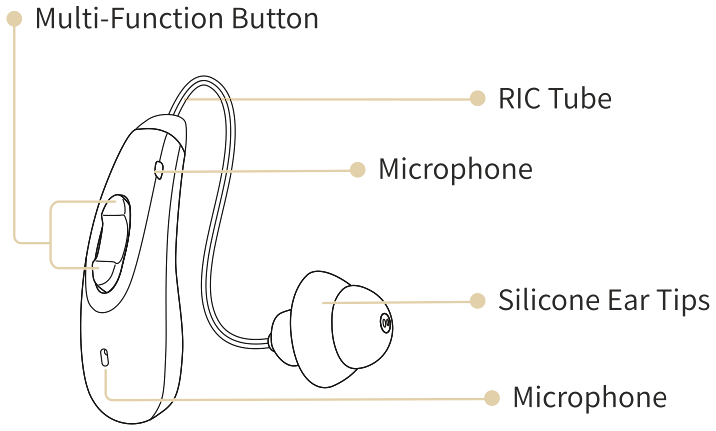
All 28 pages at 85 × 145mm, model 5126L. Same rule as the box — every instruction, spec, warning and figure stays exactly as supplied. Their own technical drawings are used throughout, recoloured blue → ink black with gold call-outs.
One decision worth explaining. The covers are black with gold, so the manual matches the box the moment it's lifted out. The interior is off-white with ink-black text — 28 pages of solid black doubles the ink cost, and your reader is 58–75 and holding it under a kitchen light. Premium outside, legible inside. The supplier's blue section bars become a gold rule; their technical line drawings carry over unchanged, recoloured blue → ink black with gold call-outs.
| Recycle charging | ≈ 5 times |
| Fully charge time | ≈ 2 hrs |
| Hearing mode working time | single ≈ 14 hrs · comprehensive ≈ 84 hrs |
| Music mode working time | single ≈ 5 hrs · comprehensive ≈ 30 hrs |
The device is with memory function, it will automatically save the mode and sound volume.
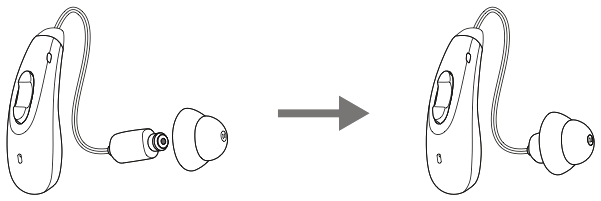
Assemble the ear tips
- Install the ear tips by placing them over the sound outlet on the hearing aids.
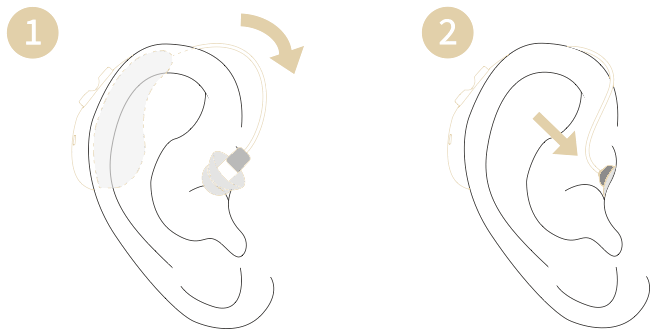
- 1Clean the ear canal. Then hang the hearing aids behind your ear.
- 2Slowly push the hearing aid’s ear tips device along the ear pinna and into the ear canal.
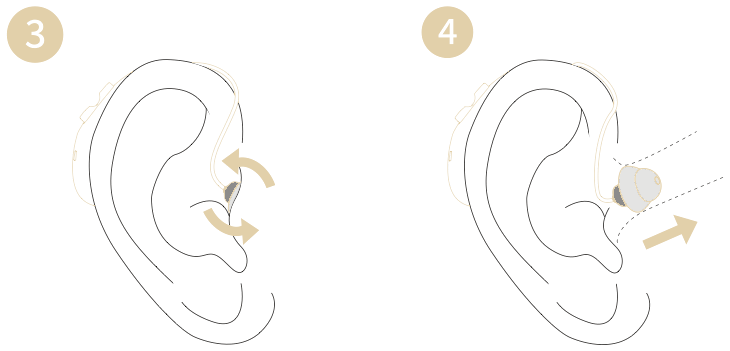
- Gently turn the ear tips up and down until they feel comfortable.
- Push the ear tips into the deepest part of the ear canal until they are stable, snug, and sealed.
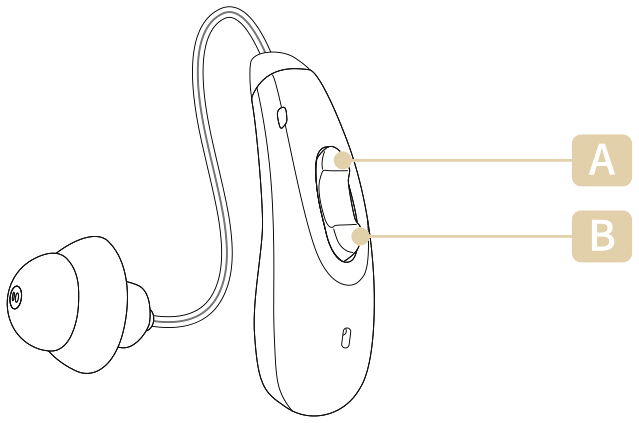
Button A
- 1Short press “Button A” to increase the volume, There are 9 levels of volume “volume 9” is the maximum volume.
- 2Hold the button “Button A” for 2 seconds to switch the scenes under hearing modes (5 modes)
Button B
- 1Short press “Button B” to reduce the volume, There are 9 levels of volume “volume 1” is the minimum volume.
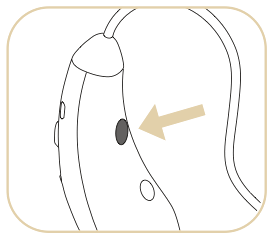
- 2Press and hold “Button B” for 6 seconds to turn On / Off the device.
*While Bluetooth is connected, short-press “Button A or B” to answer the call.
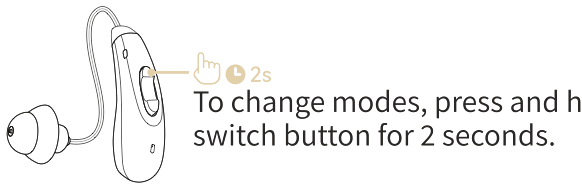
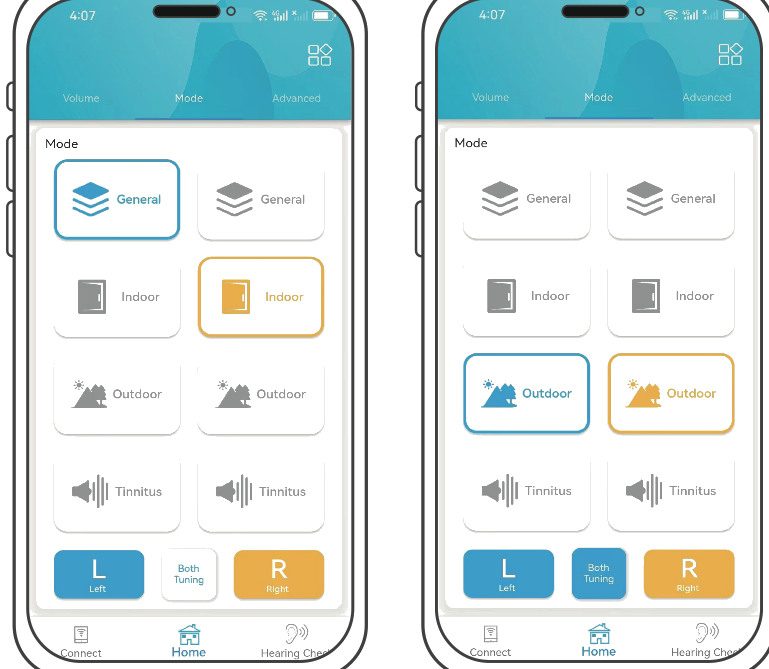
To change modes, press and hold the switch button for 2 seconds.
- 1General mode — when you hear “General mode”, it means that the hearing aids have been adjusted to general mode. The universal mode is used in daily life and can be used in most daily scenarios.
- 2Indoor mode — when you hear “Indoor mode”, it means that the hearing aids has been adjusted to the indoor mode, which is suitable for relatively quiet environment.
- 3Outdoor mode — when you hear “Outdoor mode”, it means that the hearing aids has been adjusted to the outdoor mode, which is suitable for noisy environments.
- 4Tinnitus mode — when you hear “Tinnitus mode”, it means that the hearing aids have been adjusted to tinnitus mode. Tinnitus mode is suitable for tinnitus patients or those who want to reduce their sensitivity to surrounding sounds. This mode has no sound amplification function.
- 5Music mode — when you hear “Music Mode”, it means that the hearing aids has been adjusted to the music mode. The music mode can connect to the Bluetooth of the mobile phone for listening to music and making phone calls.
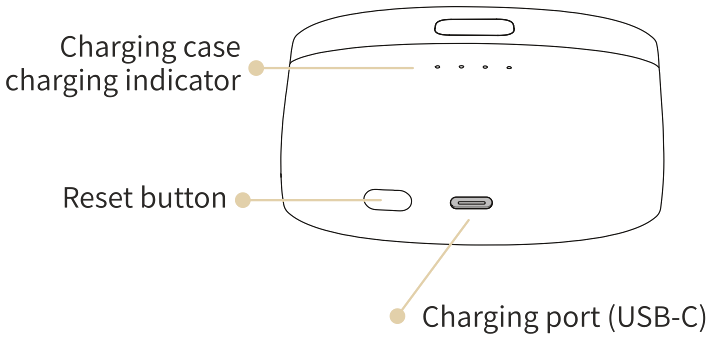
Charging indicator light
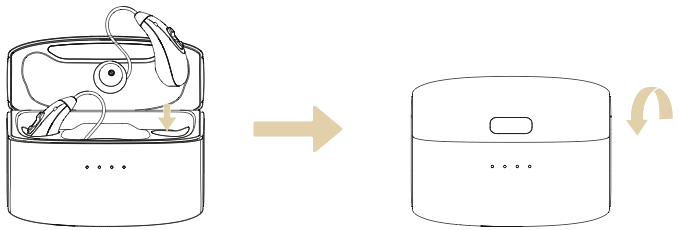
Charging case battery indicator light
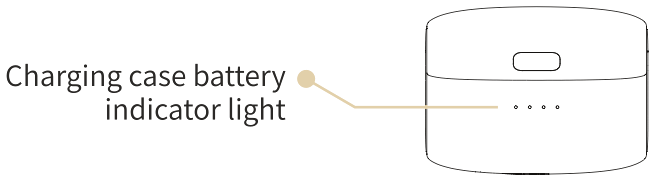
| State of light (● lit · ○ unlit) | Battery percentage |
|---|---|
| ● ○ ○ ○ | 0–25% |
| ● ● ○ ○ | 26–50% |
| ● ● ● ○ | 51–75% |
| ● ● ● ● | 76–100% |
Charging the charging case
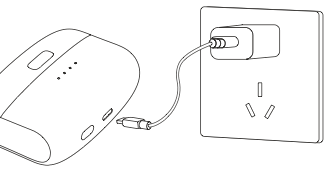
To achieve a full charge, connect the charging case to a power source with the supplied charging cable. Charging both the hearing aids and the case takes about 2 hours.
Pairing with a new device
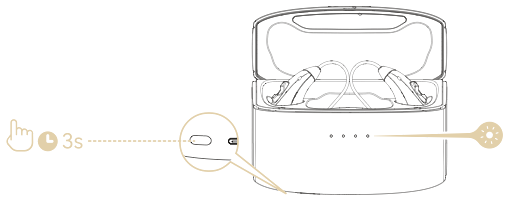
- 1Place the hearing aid in the charging case with the lid open, then press and hold the button on the case for 3 seconds. The indicator light will flash one by one in a circulating pattern. Alternatively, turn off the hearing aid manually and then press and hold the power on/off button on the hearing aid for 6 seconds.
- 2Enable the Bluetooth function on a new smart device.
- 3Select “E5126” in your new device’s Bluetooth list to connect.
Reset / Left and right connection
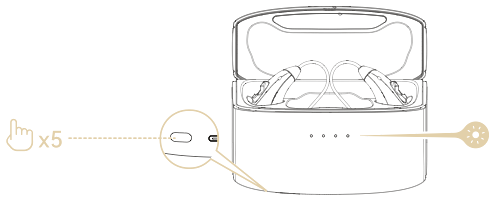
- 1Ensure that the hearing aids are powered on before restoring them to factory settings.
- 2Open the lid of the charging case.
- 3Press the reset button on the charging case 5 times.
- 4The white light will flash slowly and then turn off if successful.
- 5Then the hearing aids will enter pairing mode automatically, the indicator will flash one by one in a circulating pattern.
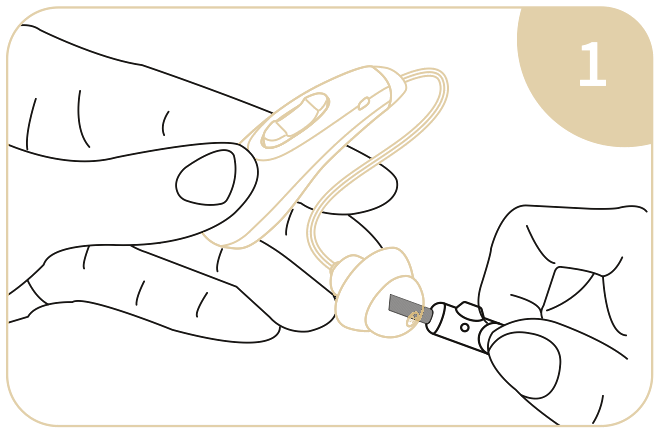
- When cleaning the ear tips, the sound outlet should face down, and use a cleaning brush to clean the dirt on the ear tips.
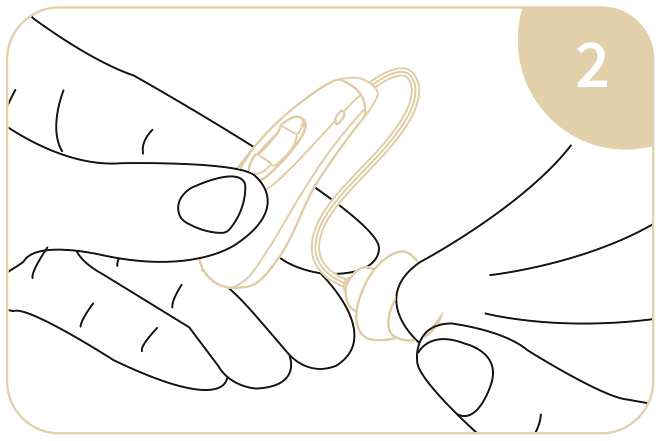
- Remove smudge or oil stains from the ear tips with a cleaning wipe or rag.
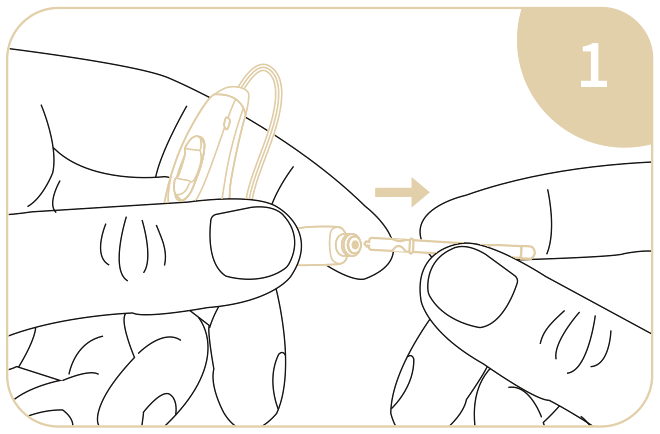
- Remove the ear tips, then use the tip of the wax guard tool to remove the old wax guard.
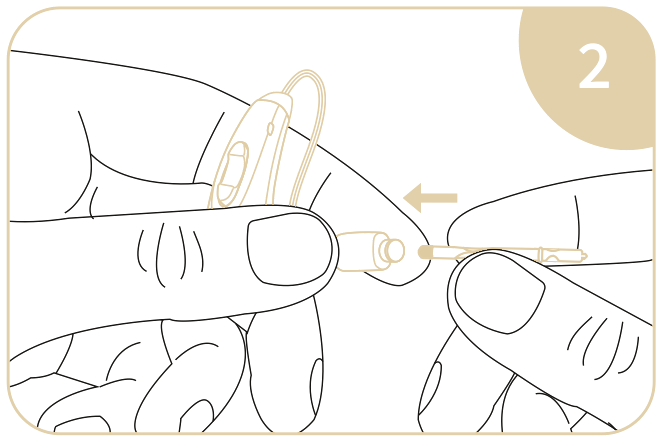
- Install the new wax guard using the round end of the wax guard tool, then reinstall the ear tips.
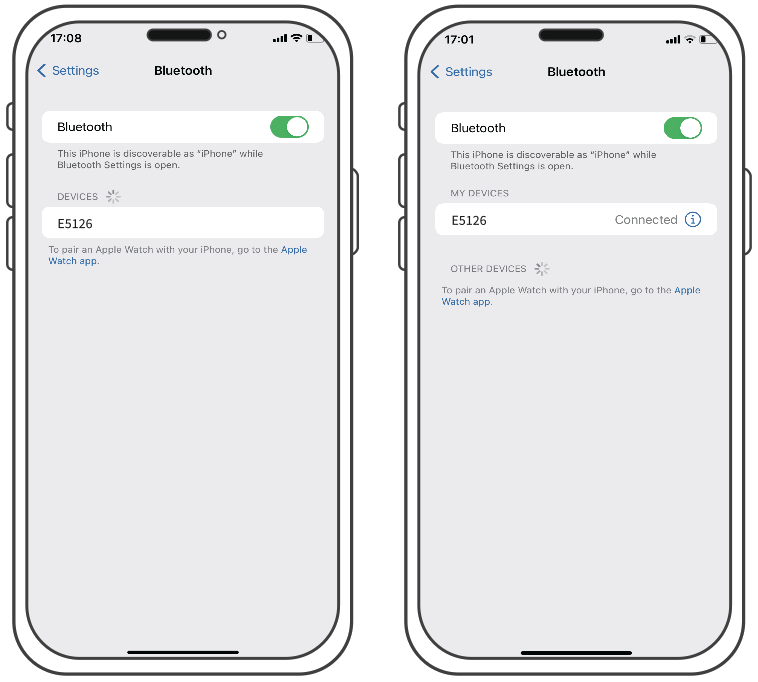
- 1Turn on hearing aids.
- 2Turn on the Bluetooth function on your phone.
- 3When the “E5126” appears in the bluetooth search interface on your phone, click it to connect.
- 4After a successful bluetooth connection, you can switch between “Music mode” and other 4 modes via the mode switch button on the hearing aids.
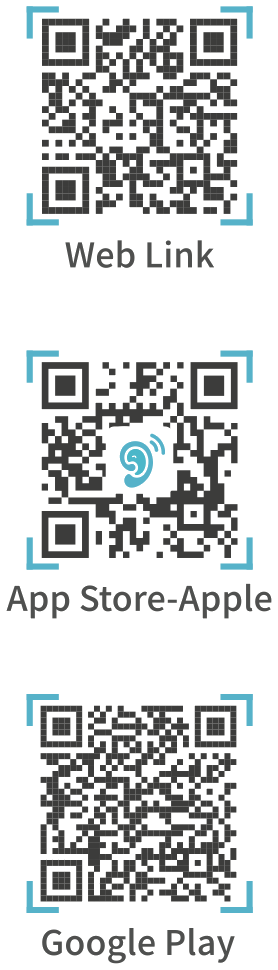
Support iOS and Android, Scan the QR code or Search “FORSOUND” through Apple App Store or Google Play, download and open it.
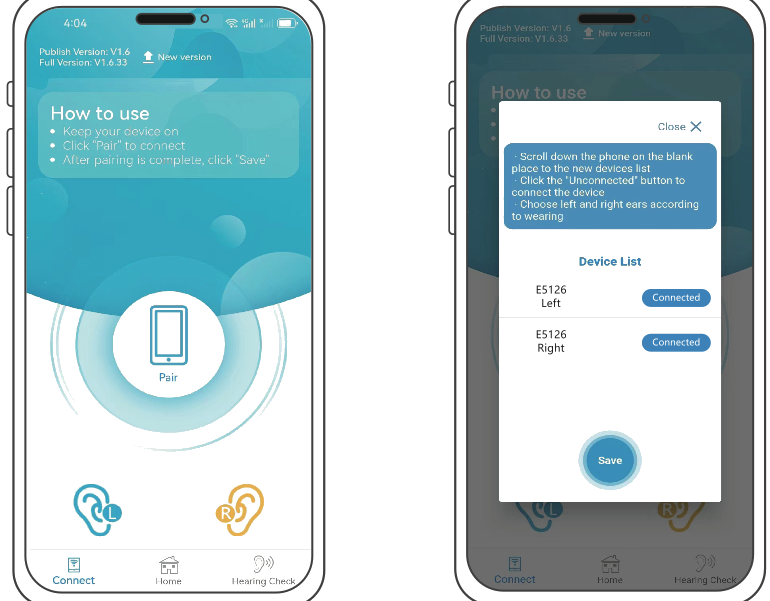
- 1Before fitting, make sure the hearing aid is assembled with closed ear tips.
- 2Open the APP, click “Pair”.
- 3Find the device name “E5126”, make sure both devices are connected, and save.
- 4After the pairing is successful, adjustments can be made on the APP.
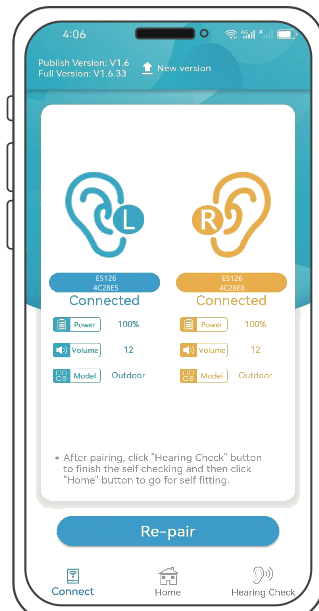
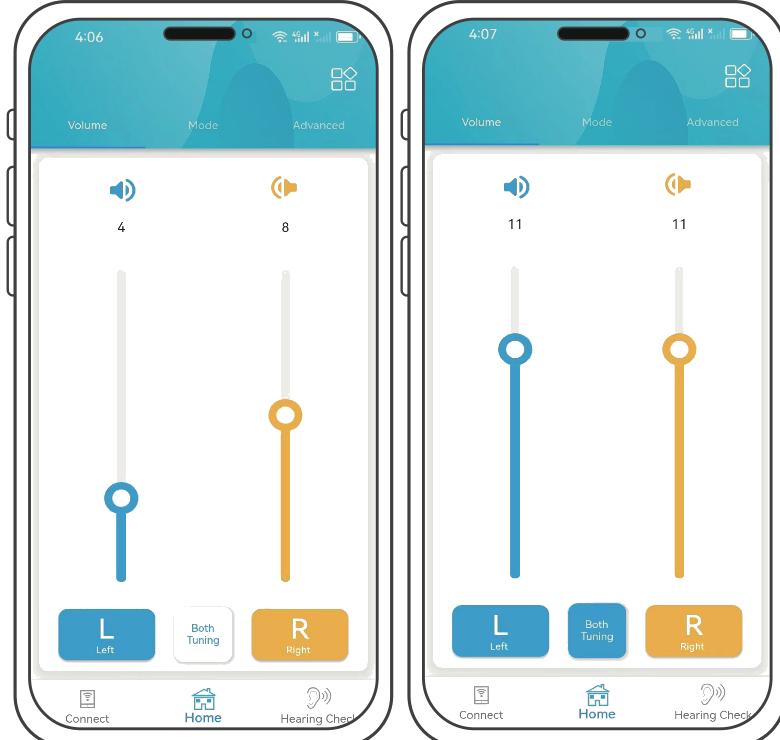
- Tap “L” and adjust left ear volume individually.
- Tap “R” and adjust right ear volume individually.
- Tap “Both Tuning” to control the left and right ears to adjust the volume synchronously.
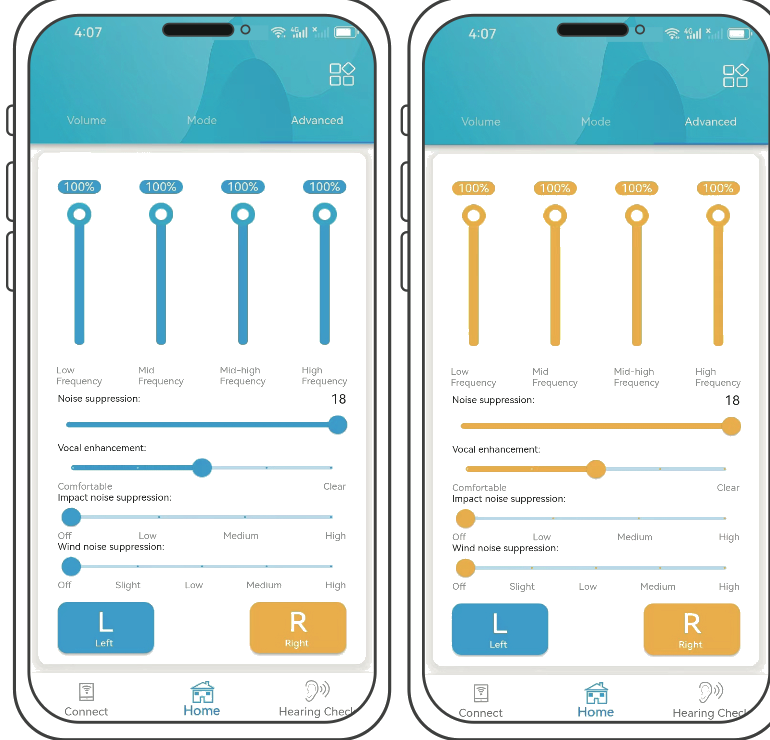
- Each ear can adjust 4 levels of frequency, which are used to adjust to your hearing loss in order.
- “Noise Suppression” — add if there is too much noise, and reduce if the amplified sound is lower for you.
- “Vocal enhancement” — if the people around you speak in a weaker voice for you, add.
- “Impact noise” — can effectively alleviate some harsh sounds, you can adjust according to the use of the scene.
- “Wind noise” — adjust the intensity of wind noise suppression according to the size of the wind in your environment.
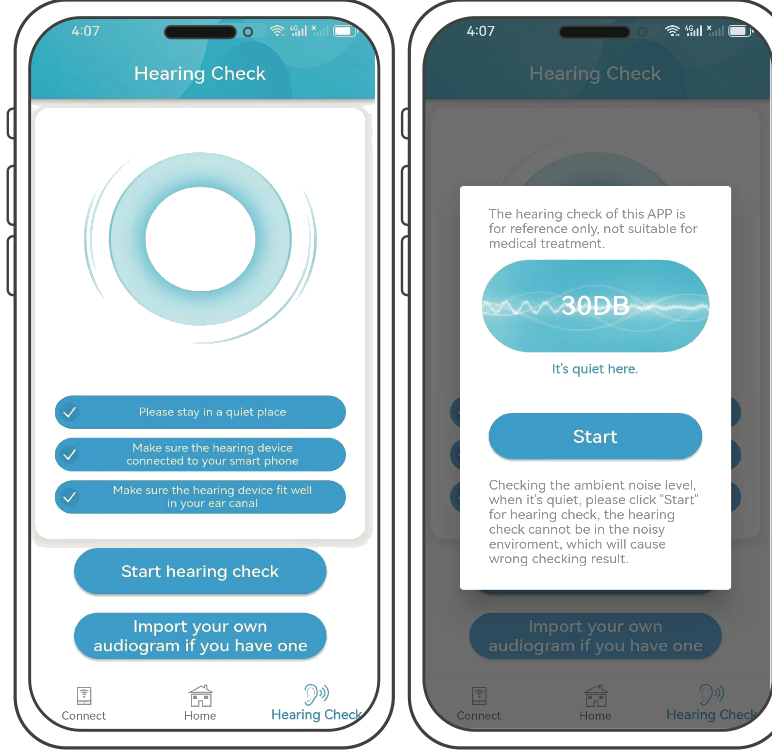
- 1Please check your environment and check the 3 conditions.
- 2Tap “Start hearing check”.
- 3Ensure a relatively quiet environment and click “Start” to perform the hearing test.
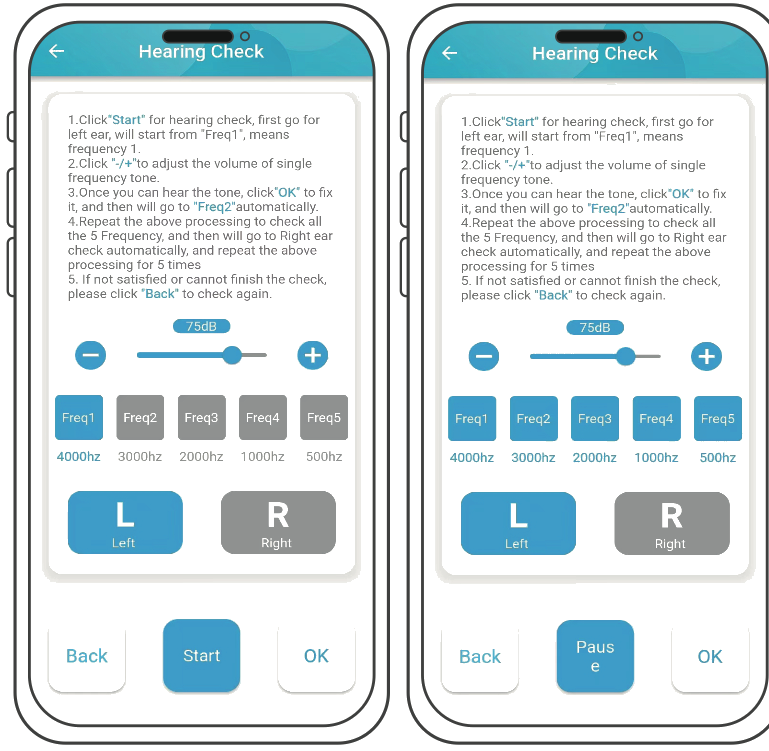
- Click on “Start”. The play button starts playing the single frequency tone.
- The volume of single frequency tone can be adjusted by pressing the “+” or “−” button.
- When you can hear the minimum single frequency tone, click “OK”.
- Test for five frequencies successively.
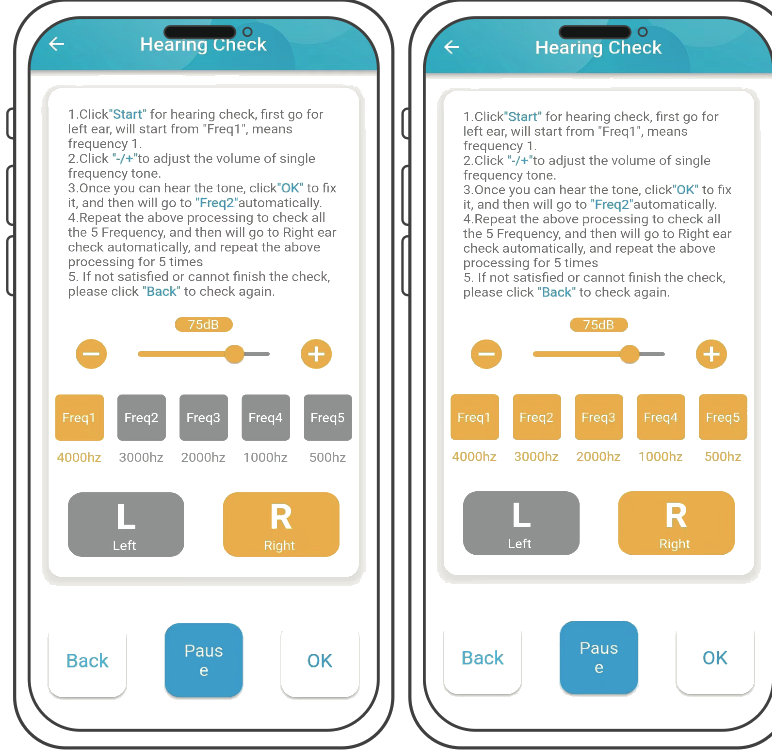
- Click on “Start”. The play button starts playing the single frequency tone.
- The volume of single frequency tone can be adjusted by pressing the “+” or “−” button.
- When you can hear the minimum single frequency tone, click “OK”.
- Test for five frequencies successively.
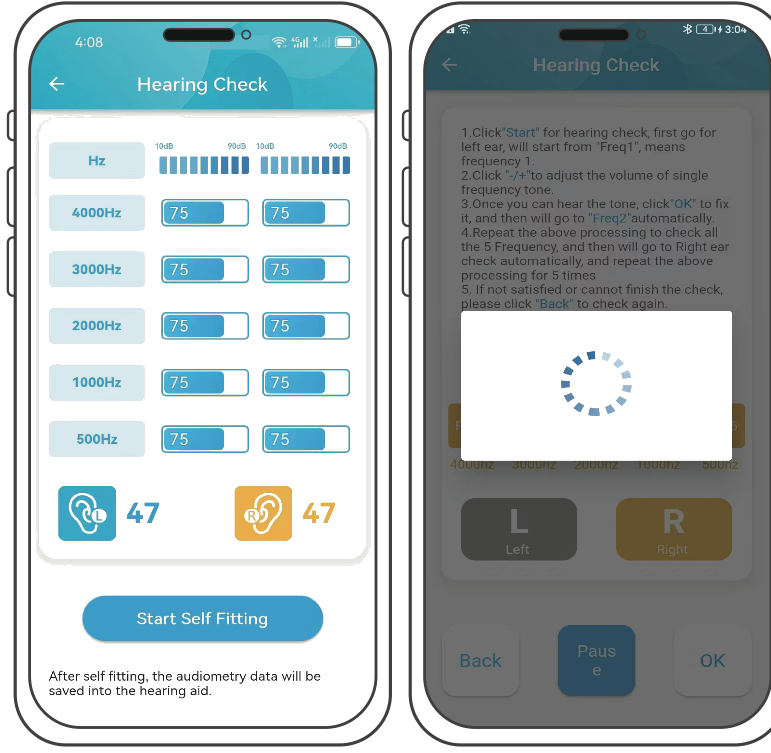
- After the test is completed, click “Start Self Fitting” on the pop-up page.
- Just wait for the refresh to complete.
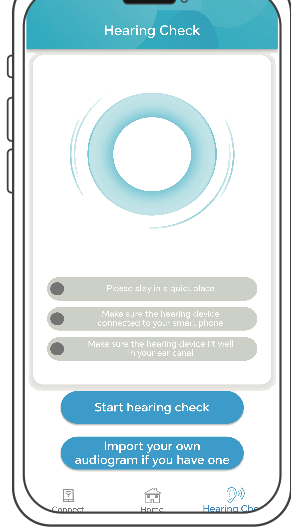
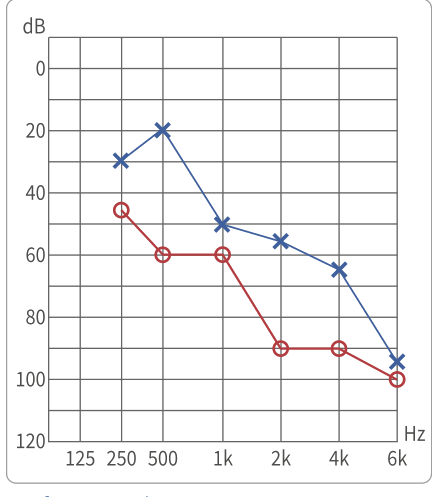
- 1Tap “Import your own audiogram if you have one”.
- 2Click on the top to switch the left and right channels for audiogram input respectively.
- 3The ✕—✕ segment of the audiogram is for Left Channel. The ○—○ segment of the audiogram is for Right Channel.
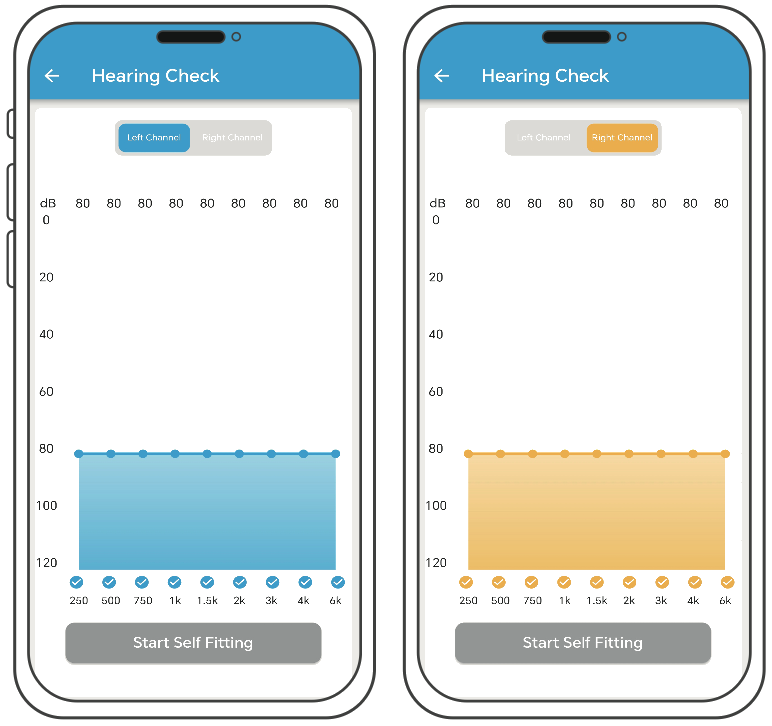
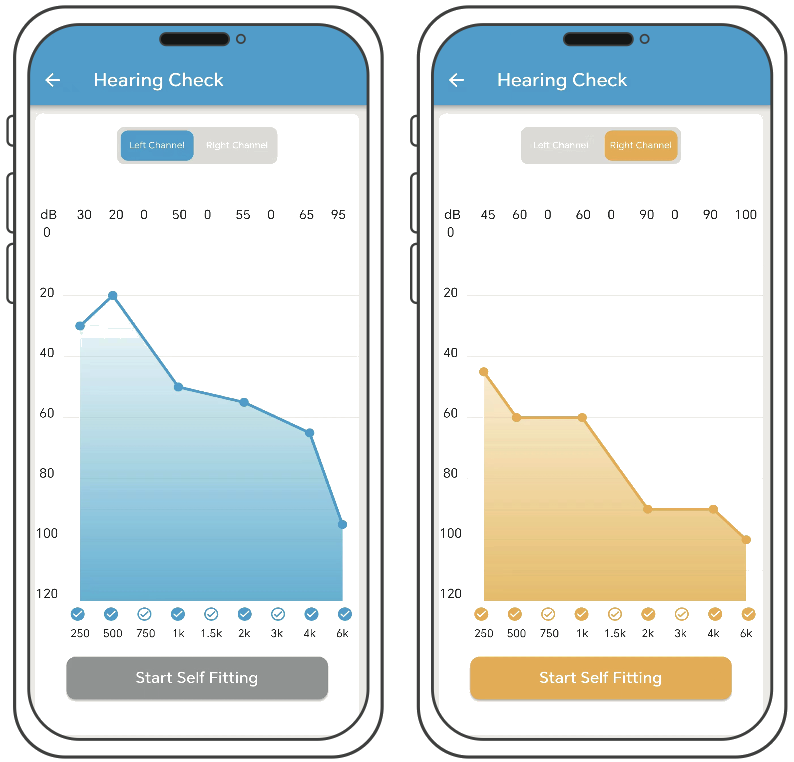
- According to the audiogram, click the corresponding horizontal coordinates.
- Slide “●” to adjust data parameters. Values above the “●” indicate hearing loss values.
- After completing of the input of audiogram, Click on “Start Self Fitting”.
| E5126-S | E5126-M | E5126-P | |
|---|---|---|---|
| Average Gain | 35±5dB | 45±5dB | 55±5dB |
| Peak Gain | 40±5dB | 50±5dB | 60±5dB |
| Average Output | 105±5 dBSPL | 110±5 dBSPL | 115±5 dBSPL |
| Maximum Output | ≤120+3dBSPL | ||
| Frequency Range | ≤250Hz~≥5000Hz | ||
| Total Harmonic Distortion(THD) | 500Hz ≤2% · 800Hz ≤2% · 1600Hz ≤2% | ||
| Equivalent Input Noise | ≤15dB | ||
| Operating Power Supply | ≤2mA @ 3.7V | ||
• The maximum output parameter is the maximum value after configuration by APP
| Problem | Possible Cause | Solution |
|---|---|---|
| Whistling | Device is put on incorrectly. | Re-adjust the device to make sure it is in the correct position. |
| Too much earwax. | Clean ear wax, replace the ear tips. | |
| Wrong size of ear tips. | Choose the best fit ear tips. | |
| No sound or intermittent sound | Device is turned off. | Turn on the device. |
| Sound hole is blocked by dirt. | Clean the device, replace the ear tips. | |
| Volume is set to be low. | Increase volume. | |
| Short battery life | Device is on while not in use. | Turn off the device when not in use, and recharge it before using it again. |
NOTE: If the problem cannot be solved by the above list of methods, please contact our customer service.
- For any injuries or pain after using the device, stop using it immediately and seek professional help from a hearing aids center or ENT physician.
- Do NOT take NMR OR CT scan exams with your device as it may cause damage to the device.
- In extremely noisy settings such as mining fields or explosion, turn off the device to avoid hearing damage.
- Products with high moisture level can cause damage to the device. Remove the device before using such products such as hair gel or face cream etc.
- Turn off the device when not in use. Charge it at least once every 6 months to promote optimal battery life.
 Avoid waterKeep the device from water. Remove the device before swimming, bathing, showering or face washing.
 Avoid heatDo not leave the device under direct sunlight or in places with excess heat.
 Avoid shockAvoid dropping the device to the ground from high above. Keep it from violent shock.
| Certificate | |
|---|---|
| Product name | Hearing aids |
| Manufacturer Part Number | 5126L |
| Product validity period | 5 years |
| FCC ID | 2BLXY-5126L |
| Inspectors |  |
This product conforms to national standards and industry standards, and has passed the inspection.
Please keep this manual for reference and follow the operating instructions provided. If you have any questions, feel free to contact us. Thank you!
the world
hello@clarionhearingaids.com
clarionhearingaids.com

· All 28 pages, unchanged
| Pp | Section | Pp | Section |
|---|---|---|---|
| 1 | Cover — User Manual, 5126L | 15 | Volume Control |
| 2 | Accessories List | 16 | Mode Switch |
| 3 | Product Overview | 17 | Equalizer Adjustment |
| 4 | Instructions For Use | 18–21 | Hearing Loss Test (4pp) |
| 5 | How To Put On | 22–23 | Import Audiogram (2pp) |
| 6 | Functions Overview | 24 | Technical Specifications |
| 7 | Switch Mode | 25 | Troubleshooting |
| 8 | Charging Indicator | 26 | Cautions |
| 9 | Reset button | 27 | Thank You / Certificate |
| 10 | Cleaning Hearing Aids | 28 | Back cover |
| 11 | Replace Wax Guard | Certificate carries: product name Hearing aids · MPN 5126L · validity 5 years · FCC ID 2BLXY-5126L. Specs list three gain variants — E5126-S / M / P at 35 / 45 / 55 ±5dB average gain. | |
| 12 | Bluetooth Connection | ||
| 13 | Download App | ||
| 14 | APP | ||
06 Making it all agree
Reading the manual against your live site turned up four places where the box, the manual and the website tell the customer different things. Worth settling before any of it prints.
| What | The manual says | Your site says | The problem |
|---|---|---|---|
| Battery | Hearing mode ≈14 hrs single, ≈84 hrs comprehensive | 25 hrs per charge, 125 hrs total | The bigger number is on the site in six places including the spec table. The manual in the box contradicts it. |
| The app | Search "FORSOUND" in the App Store or Google Play | "Open the Clarion app" — five places | There is no Clarion app to find. First thing a new customer does, and it fails. |
| Bluetooth name | Device appears as "E5126" | Not mentioned | They pair with a stranger's product code. Worth a line in the quick-start. |
| Modes | 5 — General, Indoor, Outdoor, Tinnitus, Music | "3 noise modes" | You are underselling it. Say five. |
| Variant | E5126-S / M / P — 35 / 45 / 55dB gain | "Clarity S3" | Which one ships? The gain figure is what backs the "mild to moderate" scope. |
The battery one is the one I'd fix first — it is a measurable performance claim, it is on the page six times, and the correction is sitting in the customer's own box.
07 Print
| Box board | 350gsm SBS, as current |
| Manual stock | Covers 250gsm matt, interior 120gsm uncoated · 85 × 145mm · 28pp saddle-stitched |
| Black | Rich black C60 M40 Y40 K100 — K-only prints grey next to gold |
| Gold | Metallic foil stamp, Pantone 871 C — wordmark, rules, the 16 badge. CMYK gold on black board goes mustard. |
| Finish | Soft-touch matt laminate — the matt is what makes the foil read |
| Bleed | 5mm (the die has a rounded cut corner — 3mm is too tight for registration) · keep 5mm clear of every fold and cut |
| Minimum type | 1.5mm cap height is the smallest live type (the manufacturer block). Nothing below it. Reader is 58–75 — do not reduce further. |
| Fold lines | ⚠️ Solid rich black at ~240% TAC across scored folds will crack. Ask the printer for extra scoring allowance, or knock the coverage back along the score. |
| Supply | Panel art on the supplier's own die file · outlined fonts · CMYK + 1 foil plate · PDF/X-4 |
One flag before plates: their regulatory panel is US FDA over-the-counter wording. Australian supply sits under the TGA. I've left it exactly as supplied — worth your regulatory adviser confirming it, not me changing it.
08 The ear plugs case
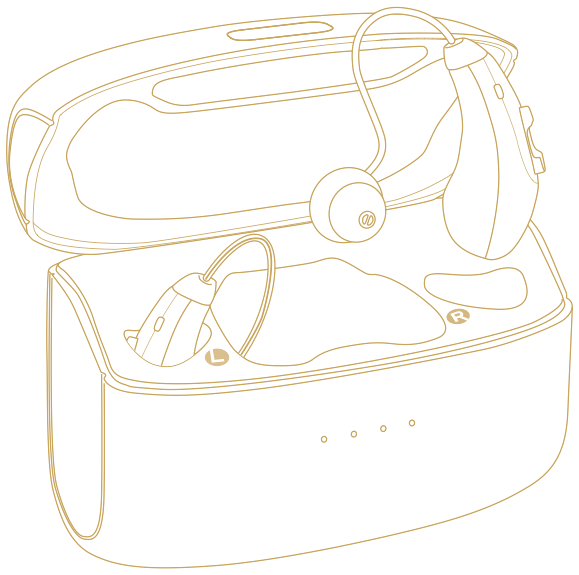
The factory sample arrived plain — a piano-black flip case, rounded square, dome lid on a rear hinge, latch at the front. Production adds the one thing that makes it ours: the C, engraved in gold, centred on the lid. Owen has confirmed the black stays. The model below is drawn from the sample photos and turns on its own.
Piano black · gold C engraved lid · flip hinge · gold direction as the box foil (Pantone 871 C)
Held for pricing. Owen owes four prices on this piece before it enters the range. The engraving artwork is the same C supplied for the box foil — one mark, one gold, everywhere.